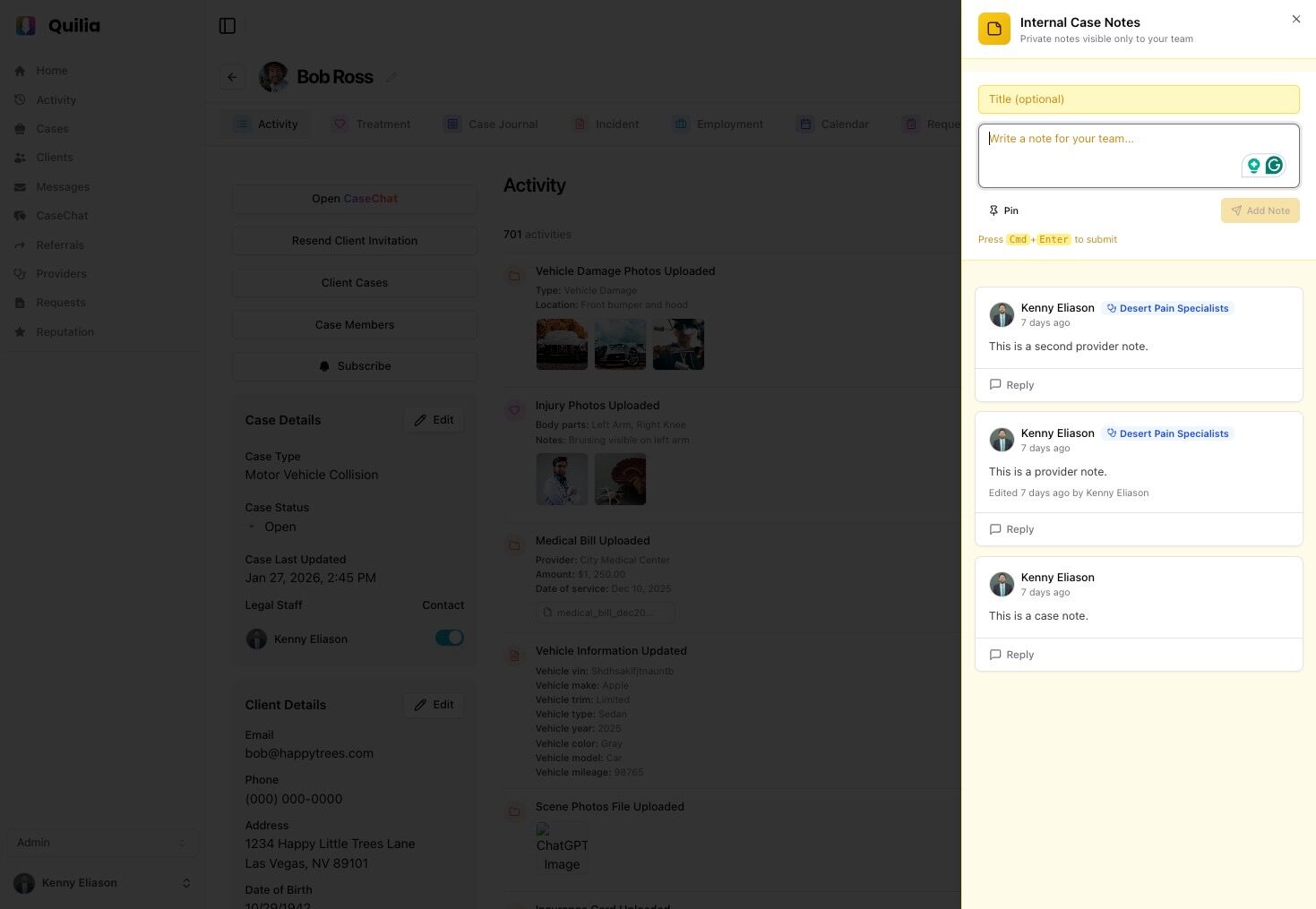
Internal Notes
Private team collaboration that clients never see
Document observations, strategies, and reminders on every case. With distinctive amber coloring that signals "team only," you'll always know these notes stay private.
A Note for Every Situation
Internal Notes adapts to your workflow with specialized note types for providers, appointments, and general case observations.
Case Notes
Floating amber button
Strategy discussions, settlement considerations, case-wide observations available on every case type.
"Defense counsel responsive - may settle early"
Provider Notes
Treatment → Providers
Track provider responsiveness, document conversations, flag issues with medical records requests.
"Dr. Smith slow to respond - follow up Friday"
Appointment Notes
Treatment → Appointments
Document visit details, client feedback about treatment, track appointment outcomes.
"Client reports increased pain after PT session"
Amber Means Team Only
The distinctive amber/yellow coloring throughout the portal instantly signals that content is for your team only. You'll never accidentally share private notes with clients.
Client-Invisible
Notes never appear in client-facing views or exports
Confidence to Write Candidly
Document strategy and concerns without hesitation
Full Team Access
Everyone with case access can view and contribute
Add a note...
Settlement meeting scheduled for next Tuesday
Client mentioned financial hardship
Built for Team Workflows
Internal Notes isn't just for documenting—it's designed to help your team collaborate effectively on every case.
Pin Important Notes
Keep critical information at the top of the list. Pinned notes are always visible so the team never misses crucial details.
Threaded Replies
Keep discussions organized with reply threads. Related conversations stay together under the original note.
Edit & Delete
Authors can modify or remove their own notes as situations evolve. Keep your notes current and relevant.
Team Visibility
All staff members with case access can view and contribute to notes. True team collaboration.
Get the Most from Internal Notes
Be Proactive
Add notes as you learn new information—don't wait for a formal update. Real-time documentation keeps everyone informed.
Pin Strategically
Reserve pinning for truly critical information. When everything is pinned, nothing stands out.
Use Replies for Discussions
Keep related conversations threaded under the original note. This prevents cluttering the main notes list.
Provide Context
Write notes that would be helpful to a team member seeing the case for the first time.
Ready to Transform Team Collaboration?
Internal Notes bridges the gap between formal case documentation and informal team communication. Give your firm a private space to collaborate effectively.
Request a Demo